Recipes for recording short chunks of data at regular intervals
Periodically recording a short chunk from an analog channel
The episodic(...) method on AnalogIn and DigitalIn may be
used to record short segments of data at fixed intervals:
from picodaq import *
import matplotlib.pyplot as plt
import numpy as np

data = []
K = 20
with AnalogIn(channel=0, rate=100*kHz) as ai:
    ai.episodic(duration=20*ms, period=100*ms)
    for k in range(K):
        data.append(ai.read())
data = np.stack(data, 1)

plt.plot(data)
plt.xlabel('Sample #')
plt.ylabel('Voltage (V)')
In this case, we record 20 milliseconds, 10 times per second (i.e.,
once every 100 ms). Note the absence of an argument to the
read(...) method: this implies reading precisely one episode worth
of data.
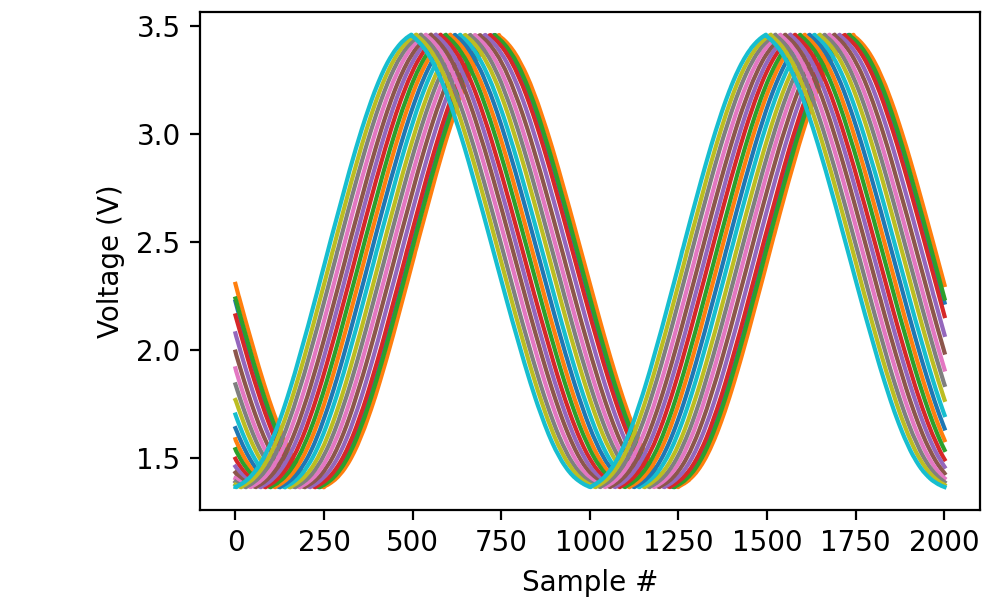
If the source frequency had been exactly 100 hertz, the recorded signals would lie on top of one another. As it is, there is a small systematic drift between traces:
In the real world, episodic recording has two main purposes:
Recording multiple channels at such a high sampling rate that the USB connection could not keep up;
Recording responses to periodic stimulation.
For use case (1), episodic recording capitalizes on not capturing data between episodes, so the USB connection can catch up. Use case (2) is often combined with triggered recording to make sure each episode lines up exactly with the stimulus.
Episodic recording with mixed signals
When combining analog with digital inputs and/or inputs with outputs,
you only need to call episodic(...) on one of the streams; the call
applies automatically to the others. For instance:
K = 20
adata = []
ddata = []
with AnalogIn(channel=0, rate=100*kHz) as ai:
    with DigitalIn(line=0, rate=100*kHz) as di:
        ai.episodic(duration=20*ms, period=100*ms)
        for k in range(K):
            adata.append(ai.read())
            ddata.append(di.read())
This simultaneously reads from “ai0” and “di0” for 20 ms out of every 100 ms.