Recipes for generating output upon a trigger
Starting a sequence upon a trigger
Just as a recording can be delayed until a trigger condition is met, the same can be done for analog or digital output:
from picodaq import *
from picodaq.stimulus import Triangle, Train
import matplotlib.pyplot as plt

pulse = Triangle(3*V, 20*ms)
train = Train(pulse, pulsecount=5)
with AnalogOut(rate=100*kHz) as ao:
    ao[0].stimulus(train)
    ao.trigger(3, polarity=1)
    ao.run()
This can be combined with recording:
import numpy as np

with AnalogOut(rate=100*kHz) as ao:
    with AnalogIn(channel=0) as ai:
        with DigitalIn(line=3) as di:
            ao[0].stimulus(train)
            ao.trigger(3, polarity=1)
            ao.run()
            adata, times = ai.readall(times=True)
            ddata = di.readall()
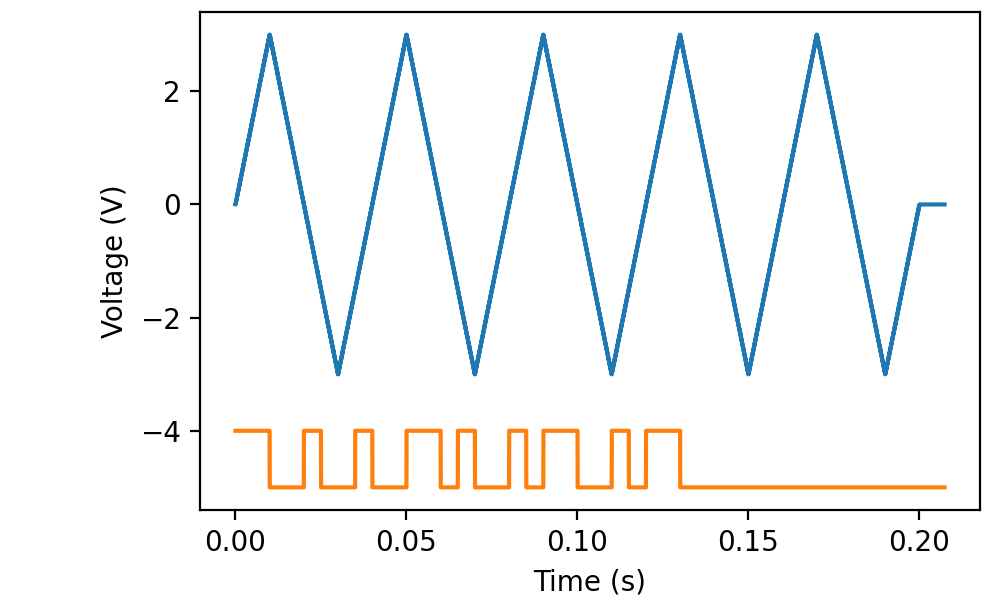
As the example shows, only the first edge in the trigger line matters. After that, the stimulus sequence is autonomous.
Repeated stimuli following a sequence of triggers
Triggered output can be combined with episodic recording. For instance, to produce a 2-s long pulse whenever a trigger is received, you might write:
from picodaq import *
from picodaq.stimulus import Triangle, Train
import matplotlib.pyplot as plt

pulse = TTL(2*s)
with DigitalOut(rate=100*kHz) as do:
    do[0].stimulus(Series(pulse, traincount=5))
    do.trigger(3, polarity=1)
    do.episodic()
    do.run()
If you call
episodic() after defining the stimuli, the episode duration is
computed automatically.
To continue forever, specify traincount=0. Note that if you do
something like:
do[0].stimulus(pulse)
The current implementation assumes a single output train, which means that only the first trigger pulse would cause a stimulus to be generated.
One further restriction applies: episodic output of continuous wave
data through the sampled() method of AnalogOut and
DigitalOut is not supported. However, the Wave stimulus shape
may be used.
Repeated stimuli with recording
Naturally, this can be combined with recording as well: